

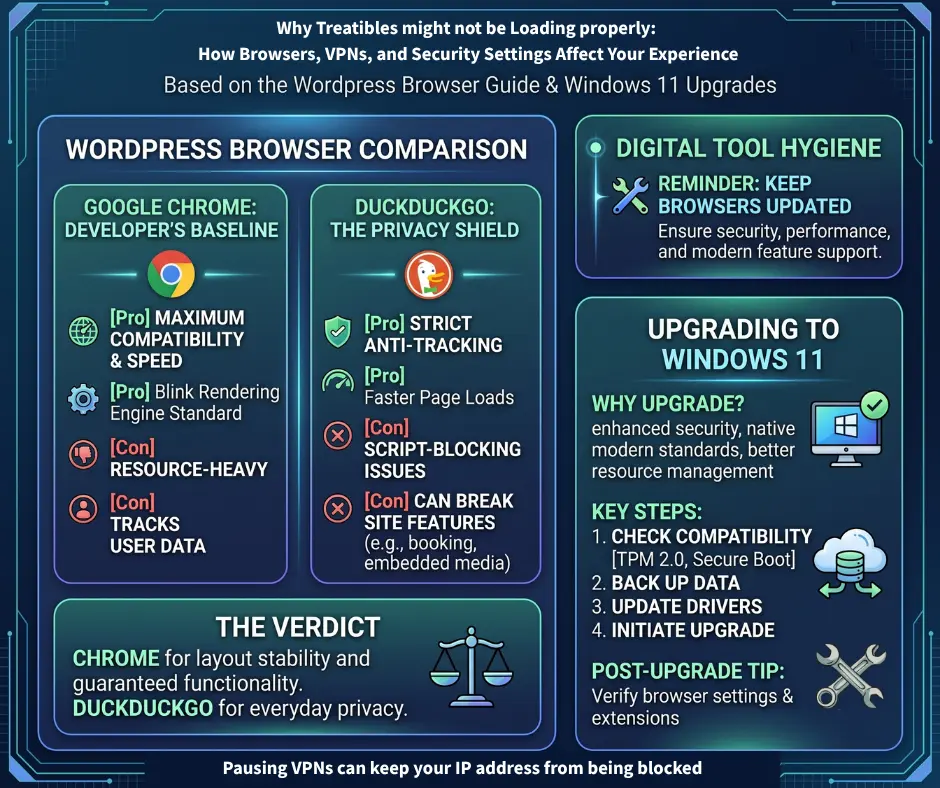
Why Treatibles may not be loading properly: How Browsers, VPNs, and Security Settings Affect Your Experience
If you have ever tried to visit Treatibles.com only to meet a distorted layout, missing checkout buttons, or a frustrating “403 Forbidden” error, you are not alone. As online platforms balance user privacy with tighter cybersecurity, everyday browsing has become surprisingly complex.
Treatibles is powered by WordPress, the platform behind nearly half of the internet. Because WordPress relies heavily on dynamic scripts and plugins, your choice of web browser, active privacy extensions, and network settings can drastically impact how our site displays and functions.
Below is your complete guide to troubleshooting Treatibles website access issues, understanding why your VPN might trigger security blocks, and ensuring a seamless shopping experience.
- Browser Compatibility: Which Browser Works Best for Treatibles?
Your web browser translates website code into the visual page you see on your screen. Different browsers use distinct rendering engines, which means a site can look perfect on one browser but appear broken on another.
Google Chrome: Maximum Compatibility & Performance
- Rendering Engine: Blink
- Why it works: Because Chrome holds the majority of global market share, nearly all WordPress themes and plugins are built and tested specifically for Chrome.
- The Pros: Best performance for interactive elements, complex media, and shopping cart functions.
- The Cons: Chrome uses significant system memory and tracks user data across sites.
DuckDuckGo: Privacy-First Browsing
- Focus: Privacy protection and script blocking
- The Pros: Blocks aggressive third-party trackers, leading to faster loading times and zero cross-site surveillance.
- The Cons: DuckDuckGo’s strict privacy shields can accidentally block essential WordPress scripts—such as interactive product selectors, checkout forms, or video embeds—misidentifying them as tracking tools.
Safari & Firefox: Rendering and Privacy Friction
- Safari (WebKit Engine): Safari uses aggressive local caching. It may serve an outdated, cached version of a webpage even after a site update, leading to broken buttons or missing page sections. Its Intelligent Tracking Prevention (ITP) can also interfere with cookie-dependent features like shopping carts.
- Firefox (Gecko Engine): Firefox’s Enhanced Tracking Protection (ETP) occasionally blocks third-party cookies required for smooth navigation. Additionally, Firefox can experience network routing conflicts (such as HTTP/3 handshake errors through Content Delivery Networks like Cloudflare), causing pages to hang indefinitely.
The Verdict: For guaranteed stability and a smooth checkout on Treatibles.com, Google Chrome is your most reliable option. If you prefer DuckDuckGo, Safari, or Firefox for daily privacy, keep Chrome installed as a backup, or temporarily toggle off privacy shields if a page fails to load properly. Always ensure your web browsers are updated to the latest version.
- Why Am I Getting a “403 Forbidden” Error? (Geo-Blocking & VPNs)
Cyberattacks against e-commerce and WordPress sites are at an all-time high. To protect customer data and server infrastructure from malicious bots, modern websites enforce strict firewall security rules.
Understanding Geo-Blocking
Web Application Firewalls (WAFs) like Cloudflare allow site administrators to restrict traffic from specific geographic regions known for high volumes of automated brute-force attacks. If you are traveling outside North America, our firewall may automatically detect your international IP address and deny access to lower security risks.
The VPN Paradox: Why Privacy Tools Trigger Firewall Blocks
To bypass regional restrictions or encrypt public Wi-Fi connections, millions of users rely on Virtual Private Networks (VPNs). However, using a commercial VPN is often the main reason a website blocks your access.
- Shared IP Addresses: When connected to a VPN, you share an IP address with hundreds of other users. If just one user on that shared IP previously engaged in spam, data scraping, or suspicious activity, global security networks flag that IP address.
- Firewall Triggers: When you visit Treatibles while connected to a flagged VPN IP, our host server’s firewall intercepts your request before the page loads.
Common signs your VPN is triggering a security block:
- Persistent CAPTCHA verification loops
- “403 Forbidden” or “504 Gateway Timeout” screen errors
- Banned IP notification messages
Note: A 403 error does not mean Treatibles.com is offline—it means the security firewall is actively blocking a flagged IP address.
- Operating System Security: The Importance of Updating to Windows 11
While your browser controls page rendering, your operating system establishes the core security foundation for your internet connection.
Official standard support for Windows 10 officially ended on October 14, 2025. Systems running outdated operating systems no longer receive critical security patches or root certificate updates.
- SSL Authentication Errors: Without updated root certificates, older operating systems cannot properly authenticate modern SSL encryption protocols used by e-commerce websites.
- Broken Connections: This breakdown in security handshakes leads to failed REST API calls, blocked plugins, distorted layouts, or blocked site connections.
How to Safely Upgrade to Windows 11
- Verify Hardware Compatibility: Use Microsoft’s official PC Health Check app to confirm your device meets system requirements.
- Check for Available Updates: Navigate to Start > Settings > Update & Security > Windows Update and click Check for updates.
- Download and Install: When prompted that Windows 11 is ready for your device, select Download and install, accept the license terms, and allow your system to complete the installation process. Your personal files, applications, and settings will automatically transfer over.
Quick Reference: How to Fix Treatibles Site Access Issues
- Keep a Backup Browser: Use Chrome specifically for e-commerce shopping if your privacy browser distorts page elements or checkout forms.
- Pause Your VPN: If you receive a “403 Forbidden” error, temporarily pause your VPN or disconnect from public servers to restore normal access.
- Switch to a Dedicated IP: If you must run a VPN constantly, consider upgrading to a dedicated IP address option so your traffic isn’t grouped with flagged public IPs.
- Clear Cache & Update: Keep your operating system and browsers updated to ensure smooth SSL handshakes and clean page loads.
Need Help Completing Your Order?
If you are experiencing technical difficulties on our website or prefer assistance placing an order, our team is here to help!
- Customer Care Line: 707-992-0854
- Hours: Monday – Friday. 9:00 AM – 5:00 PM (PST)